
Sales pipeline
A visual pipeline from enquiry to signed contract. Start an estimate straight from a lead.
DesBuProject management for UK design-build firms
DesBu is project management software for UK design-build firms. Sales pipeline, estimates and quotes, scheduling, site reports, snagging, and portals for your clients and contractors, in one system.
01The problem
You are running a professional business with amateur tools. Client updates get forgotten. Quotes go cold. RAMS live in ring binders. Subcontractors do not check email. There is a better way.
02Nine modules
Nine modules that work together to run the whole job, from first enquiry to final payment. Open any of them for the detail.
A visual pipeline from enquiry to signed contract. Start an estimate straight from a lead.
Choose the finish for every floor, ceiling, wall, door and window, and add electrics, heating, plumbing and other works. Nothing is priced until you choose it.
Turn an estimate into a numbered quote with your logo and company details. Clients approve with a signature, ask for changes or decline.
Drag-and-drop Gantt charts and a calendar, with tasks that move when their dependencies do.
Clients see progress, photos, quotes to approve and payment schedules in their own portal, with a bell for anything waiting on them.
A private link for each subcontractor, or a free contractor account. Their jobs, diary, site check-in and health and safety documents on any phone.
A private team chat, one-to-one chat with each contractor, and project chats with clients and contractors.
Digital RAMS, site inductions, toolbox talks and incident reporting, with a health and safety pack generated from the job.
Budget against actual, payment schedules, invoices with your company details, and analytics down to subcontractor days and spend.
03Mission Control
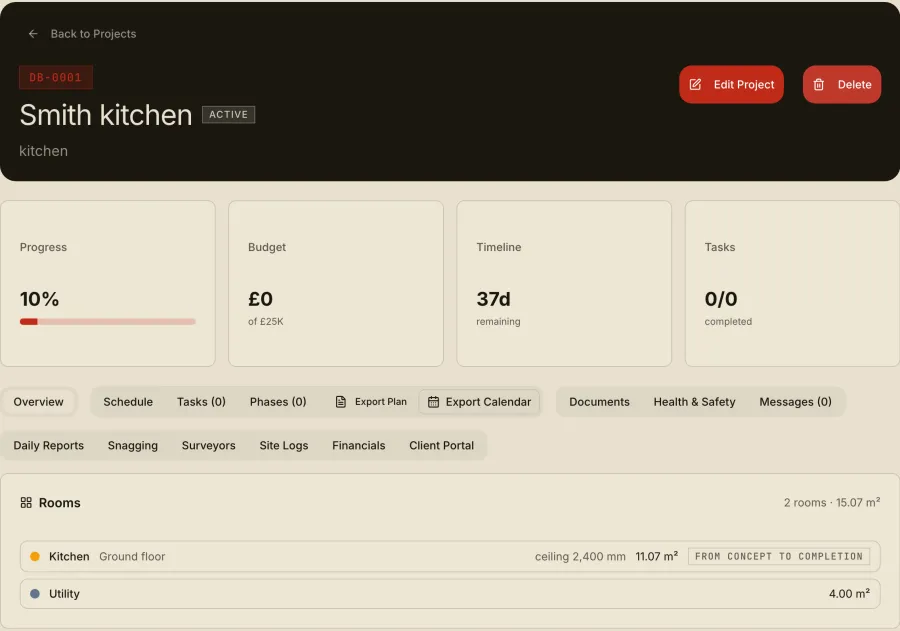
Your dashboard shows active projects, pipeline value, team members and tasks due today, with recent project messages alongside. No clicking through menus: the important stuff is right there.
04End-to-end workflow
What you price is what gets signed, what gets signed is what gets planned, and what gets planned is what gets paid for.
Every enquiry is tracked on a visual pipeline from first call to signed contract. Start an estimate straight from a lead, and use the Mission Control dashboard to see pipeline value at a glance. Rename the stages in Settings to suit how you sell.
Price each room from a Delineo survey. Choose the finish for every floor, ceiling, wall, door and window, and add electrics, heating, plumbing and other works. Quantities come from the measurements, and nothing is priced until you choose it.
Turn the estimate into a numbered quote with your logo, address and VAT number. Clients approve with a signature, ask for changes or decline, from the emailed link or inside their portal. Once sent, the quote is locked, so what was signed is what you hold.
Schedule phases and tasks on a drag-and-drop Gantt chart that adjusts when plans change. Link a survey and the planned works, added services and notes shape the task list. Assign internal teams and subcontractors to phases, and download the schedule as a calendar file.
A private team chat, one-to-one chats with each contractor, and project chats with clients and contractors. New messages land in your notification bell, and nothing that needs a reply waits unseen.
Digital RAMS, site inductions and toolbox talks, with a health and safety pack generated from the job. Contractors check in and out on site, and site managers record daily progress and incidents.
Clients see progress, photos, payments and quotes in their own portal, with a notification bell for anything waiting on them. Variations are captured on site and approved by the client with a signature before they are charged.
Payment schedules and printable invoices carry your company details. Analytics compares estimated with actual costs, shows budget against actual, and shows how many days each subcontractor worked and what you spend with them.
05Contractor hub
Each contractor gets their own private link: no app to download, no password to forget. They open it and everything they need for the job is there.
What it costs. You pay, never your contractors: the first three are included, then £2.75 a month each, added to your own bill. Remove or pause a contractor and it drops straight away. Client portals are free, always.
03With Delineo
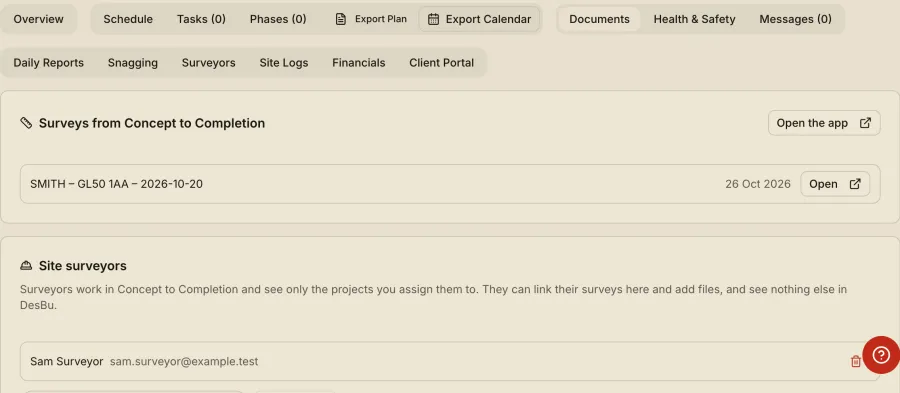
Delineo is the companion survey app. Link a survey to a DesBu project and the PDF, the photos and the rooms go across in one tap. DesBu works without it, and it works without DesBu.
Walls, openings, services, photos pinned to the wall. Measured once, on site.
Pick the DesBu project from the job card. Optional, and only shown if your account has DesBu.
One tap sends the PDF, the photos and the rooms together. Newest PDF is marked latest.
Areas, perimeters, ceiling heights, wall areas net of openings, windows, doors and services.
Choose the work room by room. Quantities from the survey, rates from your library.
04What the link does
06DesBu pricing
Every plan starts with a 14-day free trial of the full system. Annual billing is available.
Starter
One user, up to 5 active projects
£24 a month
Estimating, signed quotes, client portal and invoices, with 50 AI actions a month.
Professional
For firms with a team
£64 per user a month
For the first three users, then £49 each. Unlimited projects, Gantt scheduling, site management, change orders, analytics and contractor work orders.
FAQ
Yes, a card is needed to start. Nothing is charged until the 14 days end, and you can cancel before then.
Yes. A project moves through DesBu from the first enquiry, through an estimate and a signed quote, to the programme, the site, the client portal, invoices and the final analysis. Each stage links to the next, so you do not re-enter information.
Your team sees everything. Clients see only their own project in their portal. Contractors see their own jobs, diary and messages. The team chat is never shown to clients or contractors.
Yes. Link a survey made in Delineo to the project and its rooms, measurements, notes and files arrive in DesBu, ready to price and plan from.
No. They respond from a private link, or from their client portal link, with no password to remember.
They do not need to download an app, set a password or be trained: they open their link on their phone.
No. Each contractor only sees their own tasks and relevant documents. Your project details stay private.
Start a 14-day free trial of DesBu, with a RAAIX account.